Every successful agency runs on systems.
The problem?
Most agencies don't document those systems until something goes wrong.
A team member leaves.
A new employee starts.
A client asks how something works.
Suddenly, everyone realizes there's no documentation.
That's where Standard Operating Procedures (SOPs) come in.
The challenge is that creating SOPs manually takes time—something most agency owners don't have.
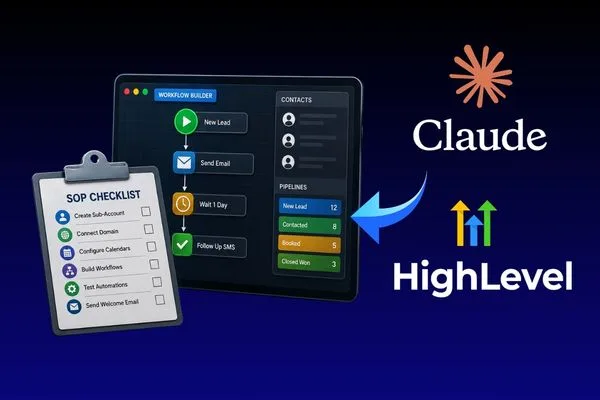
Fortunately, Claude and GoHighLevel make the process much easier.
Claude helps you write and organize SOPs, while GoHighLevel provides the workflows those SOPs support.
Here's how to use both platforms to create better systems in less time.
What Is an SOP?
A Standard Operating Procedure (SOP) is a step-by-step guide that explains how a recurring task should be completed.
Instead of relying on memory, your team follows a documented process.
Good SOPs improve:
Consistency
Team training
Client experience
Efficiency
Scalability
Whether you're onboarding a client or launching a marketing campaign, every repeatable task should have an SOP.
Why Agencies Need SOPs
Without documentation, every team member develops their own way of doing things.
That leads to:
Missed steps
Inconsistent quality
Longer onboarding
More mistakes
Slower growth
As your agency scales, documented processes become essential.
The goal isn't bureaucracy.
The goal is consistency.
Why Use Claude to Create SOPs?
Writing documentation from scratch can be overwhelming.
Claude simplifies the process by turning rough ideas into organized, easy-to-follow instructions.
It can help you:
Create step-by-step guides
Rewrite messy notes
Improve clarity
Standardize formatting
Generate checklists
Write training documents
Instead of spending hours writing documentation, you can create a polished first draft in minutes.
Where GoHighLevel Fits In
GoHighLevel powers many of the processes your SOPs describe.
For example:
Lead management
Client onboarding
Email automation
SMS campaigns
Appointment reminders
Workflow automation
CRM management
Claude documents the process.
GoHighLevel executes it.
Together, they create repeatable systems that are easy for your team to follow.
Step 1: Identify Repetitive Tasks
Start by listing everything your agency does repeatedly.
Examples include:
Client onboarding
Discovery call preparation
CRM setup
Funnel creation
Workflow building
Monthly reporting
Review request campaigns
If you perform the task more than once, it probably deserves an SOP.
Step 2: Record the Process
Don't worry about perfect writing.
Simply write down the steps or record yourself completing the task.
For example:
Create the client account.
Import contacts.
Connect the domain.
Configure calendars.
Test automations.
Send the welcome email.
This rough outline becomes the foundation for your SOP.
Step 3: Let Claude Organize Everything
Once you have your notes, ask Claude to structure them.
Example prompt:
Turn these notes into a professional Standard Operating Procedure. Use numbered steps, include best practices, explain the purpose of each step, and make the guide easy for a new employee to follow.
Within seconds, Claude transforms rough notes into a polished document.
Step 4: Add GoHighLevel Screenshots
Some tasks are easier to understand visually.
Include screenshots showing:
Workflow Builder
CRM Pipelines
Calendar Settings
Email Templates
Opportunity Stages
Visual references help reduce confusion during training.
Step 5: Build a Checklist
Every SOP should include a checklist.
Example:
Checklists reduce human error and make quality control easier.
Step 6: Store SOPs in One Place
Documentation only helps if your team can find it.
Store SOPs in a central location such as:
Google Drive
Notion
Skool Classroom
Internal Knowledge Base
Organize them by department or process.
For example:
Sales
Marketing
Client Success
Operations
GoHighLevel
Step 7: Keep SOPs Updated
Your agency evolves.
Your documentation should too.
Review SOPs every few months to reflect:
New GoHighLevel features
Updated workflows
Team feedback
Improved processes
Treat documentation as a living resource—not a one-time project.
SOP Ideas for GoHighLevel Agencies
If you're not sure where to begin, start with these:
Client onboarding
Lead qualification
CRM setup
Pipeline management
Funnel creation
Email sequence setup
SMS automation
Calendar configuration
Snapshot installation
Monthly reporting
Client offboarding
These are some of the most commonly repeated tasks inside an agency.
Common SOP Mistakes
Making Documentation Too Complicated
Keep instructions simple.
Assume a new employee is reading them for the first time.
Forgetting the "Why"
Don't just explain what to do.
Explain why it matters.
Understanding the purpose behind each step improves decision-making.
Never Updating Documentation
Outdated SOPs create confusion.
Review them regularly.
Relying Only on Text
Add screenshots, videos, or diagrams whenever possible.
People learn differently.
Example Workflow
Here's how Claude and GoHighLevel work together.
This creates a repeatable process that's easy to scale.
The agencies that scale the fastest aren't always the ones with the biggest teams.
They're the ones with the best systems.
By combining Claude's writing capabilities with GoHighLevel's automation tools, you can build SOPs faster, train team members more efficiently, and create consistent client experiences.
The more your agency grows, the more valuable documentation becomes.
Start documenting today, and your future team will thank you.
FAQs
What is an SOP?
An SOP (Standard Operating Procedure) is a documented process that explains how to complete a recurring task consistently.
Can Claude write SOPs?
Yes. Claude can organize rough notes into clear, structured, and easy-to-follow documentation.
Why should agencies create SOPs?
SOPs improve consistency, simplify training, reduce mistakes, and make businesses easier to scale.
How does GoHighLevel support SOPs?
GoHighLevel provides the workflows, CRM, and automations that many SOPs are built around.
How often should SOPs be updated?
Review them every few months or whenever your processes change significantly.
Build Systems That Scale
At Havstock, we help agencies combine AI tools like Claude with GoHighLevel to build smarter systems, automate repetitive work, and create documentation that supports long-term growth. Strong SOPs don't just save time—they make your entire business more scalable.