
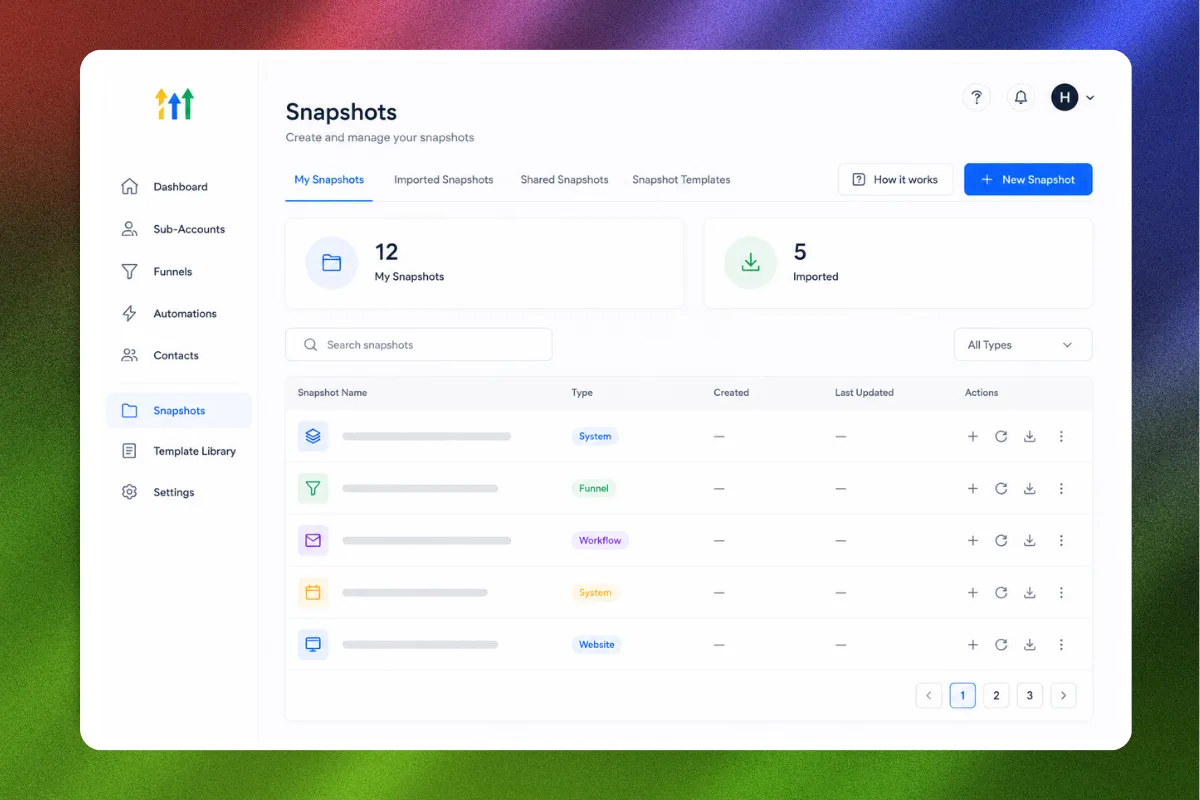
Building a GoHighLevel sub-account from scratch takes hours, sometimes days, and that is time you could spend closing clients or delivering results. Snapshots eliminate that problem entirely. They let you package an entire sub-account, including funnels, workflows, calendars, forms, custom fields, email templates, and pipeline configurations, into a single transferable template that deploys in minutes.
Whether you run a coaching business that needs a repeatable setup for each new program, or you operate an agency onboarding clients into GoHighLevel, snapshots are the fastest way to go from zero to fully operational without rebuilding the same system over and over again.
This guide covers everything: what snapshots include, how to create them, how to import them, and how to use them strategically to scale your business or agency. No fluff. Just the technical walkthrough and the strategic thinking behind it.
What Exactly Is a GoHighLevel Snapshot?
A snapshot is a complete clone of a GoHighLevel sub-account's configuration. Think of it as a blueprint that captures every asset, automation, and setting within a sub-account so you can replicate it elsewhere.
When you create a snapshot, GoHighLevel packages up:
- Funnels and funnel pages
- Websites and website pages
- Workflows and automations
- Calendars and booking configurations
- Forms and surveys
- Email templates and sequences
- SMS templates
- Pipeline stages and configurations
- Custom fields and custom values
- Trigger links
- Social planner templates
- Membership and course structures
- Tags and contact segments
The snapshot does NOT include actual contact data, conversation history, or account-level settings like API keys and integrations. It captures the structure and assets, not the data.
“A snapshot is the difference between spending three days building a client's account and spending thirty minutes deploying a proven system.”
Who Should Use Snapshots
Snapshots are useful for three primary use cases:
1. Agencies Onboarding Clients
If you run a marketing agency or GoHighLevel reseller (SaaS mode), every new client needs a configured sub-account. Without snapshots, your team manually builds each account: creating funnels, setting up workflows, configuring calendars, building pipelines. With snapshots, you deploy a pre-configured account in minutes and only customize the branding and copy.
This is how agencies scale past ten, twenty, or fifty clients without hiring a setup team for every onboard.
2. Coaches and Consultants Launching New Offers
Every time you launch a new program, challenge, or offer, you need a set of assets: landing pages, email sequences, booking systems, follow-up automations. If you have already built a working version once, snapshot it. The next launch becomes an import and customize operation instead of a rebuild.
3. Template and Snapshot Sellers
There is an entire market for GoHighLevel snapshots. Businesses like Havstock build complete, pre-configured systems, including funnels, automations, and templates, and sell them as ready-to-import snapshots. If you have expertise in a specific niche, packaging that expertise into a snapshot creates a productized, scalable offer.
“Snapshots turn one-time work into repeatable assets. Build once, deploy forever.”
How to Create a Snapshot: Step by Step
Creating a snapshot requires an Agency account (you cannot create snapshots from a standalone sub-account). Here is the exact process:
Step 1: Build Your Template Sub-Account
Before you create the snapshot, you need a sub-account that contains everything you want to include. This is your "master" or "template" account.
Best practice: create a dedicated sub-account specifically for snapshot templates. Do not snapshot a live client account that contains real data and one-off customizations. Your template account should be clean, organized, and ready to deploy.
Set up all of the following in your template account:
- All funnels and website pages (with placeholder copy and images)
- Workflows for common automations (welcome sequence, appointment reminders, follow-up, etc.)
- Calendar configurations (types, availability, booking forms)
- Pipelines with clearly defined stages
- Email and SMS templates
- Forms and surveys
- Custom fields and custom values
- Tags for segmentation
Step 2: Navigate to Snapshots
- Log into your GoHighLevel agency dashboard.
- Click Settings in the left sidebar.
- Select Company from the settings menu.
- Click the Snapshots tab.
Step 3: Create the Snapshot
- Click the Create New Snapshot button (or the blue plus icon).
- Give your snapshot a descriptive name. Use a naming convention like: "[Niche] - [Offer Type] - [Version]". Example: "Coaching - High Ticket Funnel - v2.1"
- Select the source sub-account (the template account you built in Step 1).
- Choose which assets to include. You can select all or pick specific elements.
- Click Create Snapshot.
GoHighLevel will process the snapshot. Depending on the size and complexity of the sub-account, this can take anywhere from a few seconds to a few minutes.
Step 4: Generate a Share Link
Once the snapshot is created, you can generate a shareable link:
- Find your snapshot in the list.
- Click the three-dot menu (or the share icon).
- Select Share Snapshot or Copy Share Link.
This link allows anyone with a GoHighLevel account to import your snapshot into their sub-account. This is how snapshot sellers distribute their products and how agencies share templates with clients.
“Treat your master template account like a product. Version it, document it, and keep it updated as GoHighLevel releases new features.”
How to Import a Snapshot
Importing a snapshot is even simpler than creating one. There are two ways to do it:
Method 1: Import via Share Link
- Get the snapshot share link from the creator (or from a purchase confirmation email).
- Make sure you are logged into your GoHighLevel account.
- Open the share link in a new browser tab while logged in.
- GoHighLevel will prompt you to select which sub-account should receive the snapshot.
- Choose whether to merge with existing assets or overwrite the current configuration.
- Click Import.
Method 2: Import from the Agency Dashboard
- Go to Settings > Company > Snapshots.
- Click the Import button.
- Paste the snapshot share link or upload the snapshot file.
- Select the target sub-account.
- Choose merge or overwrite.
- Click Import.
Merge vs. Overwrite: Which to Choose
Merge adds the snapshot's assets to the existing sub-account without deleting anything that is already there. Use merge when you want to add new funnels or workflows to an account that already has some configuration.
Overwrite replaces the existing configuration with the snapshot's contents. Use overwrite for fresh accounts or when you want to start clean with the snapshot's exact setup.
For most use cases, merge is the safer option. Overwrite should only be used on empty or new sub-accounts.
What to Include in a High-Quality Snapshot
Not all snapshots are created equal. A snapshot that just dumps a few funnels and a basic workflow is not particularly useful. Here is what separates a basic snapshot from a professional-grade one.
The Complete System Approach
A great snapshot is a complete business system, not just a collection of individual assets. It should include:
Funnels with connected workflows. Every funnel page should have its form connected to a workflow that handles what happens after the opt-in, booking, or purchase. The funnel and the automation behind it should work together as a single system.
Pipelines that match the funnel stages. If your snapshot includes a sales funnel with opt-in, application, and close stages, the pipeline should mirror those stages. When a lead moves through the funnel, the pipeline updates automatically.
Email and SMS templates ready to customize. Do not leave blank email actions in workflows. Include well-written templates with clear placeholder text (e.g., "[YOUR NAME]", "[YOUR OFFER NAME]") that the user can quickly customize.
Calendar configurations that are realistic. Set up calendars with reasonable default availability, buffer times, and confirmation settings. Include the appointment reminder workflow so the calendar does not exist in isolation.
Custom fields and values that are documented. If your workflows reference custom fields (and they should), make sure those fields exist in the snapshot and have clear names. Include a readme or documentation page explaining what each custom field is for.
“A snapshot should be a turnkey system. The person who imports it should be able to customize the branding, update the copy, and launch within a day.”
Documentation Matters
Include a documentation funnel page or a simple text page within the snapshot that explains:
- What the snapshot includes
- How the system works (which funnels connect to which workflows)
- What needs to be customized (placeholder text, images, calendar availability)
- Any integrations that need to be set up separately (payment processors, Zoom, etc.)
This documentation dramatically reduces support requests if you are selling snapshots and reduces setup confusion if you are deploying for clients.
Snapshot Strategy for Agencies
If you run an agency, snapshots should be central to your onboarding process. Here is a strategic framework:
Tier Your Snapshots
Create multiple snapshot tiers based on client needs:
Starter Snapshot: Basic funnel, simple follow-up workflow, one calendar, one pipeline. For clients who need a simple online presence and booking system.
Growth Snapshot: Multiple funnels (lead magnet, sales page, booking), multi-step nurture workflows, review request automation, pipeline with five or more stages. For clients ready to scale their lead generation.
Enterprise Snapshot: Everything in Growth plus membership/course structure, advanced segmentation workflows, reporting dashboards, multi-calendar setup, and white-label configurations. For high-value clients with complex operations.
Pricing Around Snapshots
Snapshots let you productize your agency services. Instead of custom-quoting every client setup, offer standardized packages:
- "Quick Start" setup: Starter Snapshot + 1 hour customization = $500
- "Growth Engine" setup: Growth Snapshot + 3 hours customization = $1,500
- "Full Build" setup: Enterprise Snapshot + full customization = $3,000+
The snapshot handles 80 percent of the work. Your team handles the 20 percent that is unique to each client. This model scales because your delivery time stays consistent regardless of client volume.
“Agencies that productize with snapshots onboard clients in days instead of weeks, and their margins improve because the heavy lifting is done once.”
Snapshot Strategy for Coaches and Consultants
Even if you do not run an agency, snapshots save you significant time.
Snapshot Your Winning Systems
Once you have a funnel, workflow, or launch sequence that is producing results, snapshot it immediately. Do not wait until you "need" it. Your future self will thank you when it is time to launch the next offer and you have a proven template ready to deploy.
Use Snapshots for Seasonal Offers
If you run recurring launches (quarterly challenges, annual programs, seasonal promotions), create a snapshot for each offer type. When launch season comes around, import the snapshot into a fresh sub-account, update the dates and details, and you are live. No rebuilding.
Buy Snapshots to Skip the Learning Curve
If you are new to GoHighLevel or you want to see how an expert structures a system, buying a pre-built snapshot is the fastest way to learn. The High Ticket OS is a good example. It is a complete high-ticket sales system with funnels, follow-up workflows, pipeline configurations, and appointment booking, all pre-built and ready to import.
Rather than spending weeks figuring out the optimal funnel structure or workflow logic, you import a system that has already been tested and refined. Customize the branding and copy, and you are operational.
Common Snapshot Mistakes
Snapshotting a messy account. If your template account has duplicate funnels, broken workflows, or orphaned forms, all of that mess gets included in the snapshot. Clean your template account thoroughly before creating the snapshot.
Not testing after import. Always import your snapshot into a test sub-account and click through every funnel page, trigger every workflow, and check every calendar before deploying it to a client or going live. Broken links, disconnected forms, and incomplete workflows are common after import and easy to fix if you catch them.
Ignoring version control. When you update your template account, create a new snapshot with a version number. Keep older versions archived in case you need to roll back. Use naming like "Coaching Funnel v1.0", "Coaching Funnel v1.1", "Coaching Funnel v2.0."
Not replacing placeholder content. It sounds obvious, but it happens constantly. Someone imports a snapshot, changes the logo, and goes live without updating the placeholder text. "[YOUR NAME]" showing up on a live landing page is not a great look.
Overwriting an active account. If you accidentally use overwrite instead of merge on a sub-account that has live contacts, campaigns, or custom configurations, you can lose work. Always double-check which option you are selecting and always import into empty or test accounts first.
“The snapshot is only as good as the template account it came from. Invest time in building a clean, well-documented template, and every deployment after that is effortless.”
Advanced: Selling Snapshots as a Product
If you have deep expertise in a specific niche and you know how to build high-converting GoHighLevel systems, selling snapshots is a legitimate revenue stream.
What Buyers Want
Snapshot buyers are typically GoHighLevel users who either lack the technical skill to build systems themselves or want to skip the time investment. They are looking for:
- A complete, working system (not just a pretty funnel with no automation behind it)
- Clear documentation and setup instructions
- Proven templates with real conversion data or case studies
- Ongoing support or updates as GoHighLevel evolves
Pricing Snapshots
Snapshot pricing ranges widely based on completeness and niche specificity:
- Basic funnel-only snapshots: $27 to $97
- Complete systems with workflows and pipelines: $197 to $497
- Full business-in-a-box snapshots with documentation: $497 to $1,997
- Premium niche-specific systems with ongoing updates: $997 to $2,997
The more complete and specific the system, the higher the price it commands. A generic "coaching funnel" competes on price. A "Discovery Call Funnel System for Executive Coaches with Automated Qualification, Pipeline Management, and Client Onboarding" competes on value.
Distribution
You can sell snapshots through:
- Your own website (using GoHighLevel's checkout pages)
- Marketplaces like the GoHighLevel snapshot marketplace
- Social media and content marketing
- Partnerships with other GoHighLevel agencies
The Revenue Calculator can help you model different pricing and volume scenarios for a snapshot product business.
Snapshot Maintenance: Keeping Your Templates Current
GoHighLevel ships updates regularly, including new features, UI changes, and workflow improvements. Your snapshots need to keep pace.
Quarterly Review Checklist
Every quarter, review your master template accounts and update:
- Funnels: are pages using the latest builder features? Any deprecated elements?
- Workflows: are you using the latest triggers and actions? Any new features worth adding?
- Calendars: do configurations still reflect best practices?
- Templates: are email and SMS templates still compliant with deliverability best practices?
- Custom fields: any new fields needed based on platform updates?
After updating, create a new snapshot version and update your documentation.
Breaking Changes
Occasionally, GoHighLevel will deprecate a feature or change how something works. When this happens, test your snapshots immediately. A workflow trigger that no longer exists or a form element that has been replaced can break the entire system after import.
Stay subscribed to GoHighLevel's changelog and release notes. Test every snapshot after major platform updates.
FAQ
What is included in a GoHighLevel snapshot?
A snapshot includes all configurable assets within a sub-account: funnels, websites, workflows, calendars, forms, surveys, email and SMS templates, pipelines, custom fields, custom values, tags, trigger links, and membership/course structures. It does not include actual contact data, conversation history, or account-level integrations like API keys.
Can I use snapshots without an Agency account?
You can import snapshots into any GoHighLevel account (including standalone sub-accounts) using a share link. However, creating and managing snapshots requires an Agency account. If you only need to import snapshots from other providers, a standard account works fine.
Will importing a snapshot delete my existing data?
Only if you choose the "overwrite" option. The "merge" option adds the snapshot's assets alongside your existing configuration without deleting anything. For safety, always use merge on accounts that contain existing work, and always test imports on a fresh sub-account first.
How long does it take to import a snapshot?
Most snapshots import within one to five minutes, depending on the complexity and number of assets. Very large snapshots with extensive funnel pages and workflows can take up to ten minutes. You will see a progress indicator during the import process.
Can I share snapshots with people outside my agency?
Yes. When you generate a share link for your snapshot, anyone with a GoHighLevel account can import it. This is how snapshot sellers distribute their products. The share link does not expire unless you manually revoke it.
What happens to workflows after import?
Imported workflows are set to "Draft" status by default. This is intentional so you can review and customize them before they go live. Once you have verified the workflow configuration and updated any placeholder content, switch it to "Published" to activate it.
Can I snapshot individual assets instead of the whole account?
Yes. When creating a snapshot, you can select which asset types to include. If you only want to snapshot your funnels and workflows but not your calendars or pipelines, you can do that. This is useful for creating focused, modular snapshots.
How often should I update my snapshot templates?
Review and update quarterly at minimum. If GoHighLevel releases a major update that affects your templates, update immediately. Always create a new version when updating so you can roll back if needed.
Ready to skip months of building and start with a proven GoHighLevel system? The High Ticket OS is a complete snapshot with funnels, workflows, pipelines, and automations, designed specifically for coaches and consultants selling high-ticket offers. Import it, customize the branding, and launch this week.