
Your next client is reading your reviews right now, and if there are only three of them from two years ago, they are already clicking on your competitor. Online reviews are the single most underrated growth lever for coaches, consultants, and service-based businesses. Everyone knows they matter. Almost nobody has a system for collecting them consistently.
The problem is not that clients are unhappy. Most are thrilled with the results. The problem is that asking for reviews feels awkward, remembering to ask is inconsistent, and following up when someone forgets takes time you do not have. So the reviews trickle in randomly, if they come at all.
GoHighLevel has a built-in reputation management system that automates the entire process. From sending review requests at the right moment to monitoring what people say about you across platforms, GHL turns review collection from a manual chore into a background process that runs on its own.
This guide walks through the complete setup: configuring review requests, building automation workflows, handling negative feedback, and using social proof to convert more leads.
Why Reviews Drive Revenue
Before diving into the setup, let's look at the numbers that make reputation management non-negotiable.
The Trust Factor
92% of consumers read online reviews before making a purchase decision. For high-ticket services like coaching and consulting, that number is likely higher. When someone is about to invest $3,000 to $10,000 in a coaching program, they want proof that others got results.
Reviews provide that proof in a way that marketing copy never can. A potential client reading "I doubled my revenue in 90 days working with this coach" from a real person carries more weight than any sales page headline.
The SEO Factor
Google uses review signals (quantity, quality, velocity, and diversity) as ranking factors for local search and Google Business Profile visibility. More reviews and higher ratings directly impact where you show up when someone searches "business coach near me" or "marketing consultant [city]."
Coaches and consultants who actively collect reviews outrank competitors who don't, even if those competitors have better websites or more content.
“Reviews are not just social proof. They are an SEO asset that compounds over time.”
The Conversion Factor
Businesses with 50+ reviews convert at nearly double the rate of those with fewer than 10. Adding a review widget or testimonial section to your funnel pages can increase conversion rates by 15-35%. When you combine a strong offer with visible social proof, objections drop.
Setting Up Reputation Management in GoHighLevel
GoHighLevel's reputation management feature lives under the "Reputation" tab in your sub-account. Here is how to configure it from scratch.
Step 1: Connect Your Platforms
Navigate to Settings, then Reputation Management. Connect the platforms where you want to collect and monitor reviews:
- Google Business Profile (most important for local visibility)
- Facebook Business Page
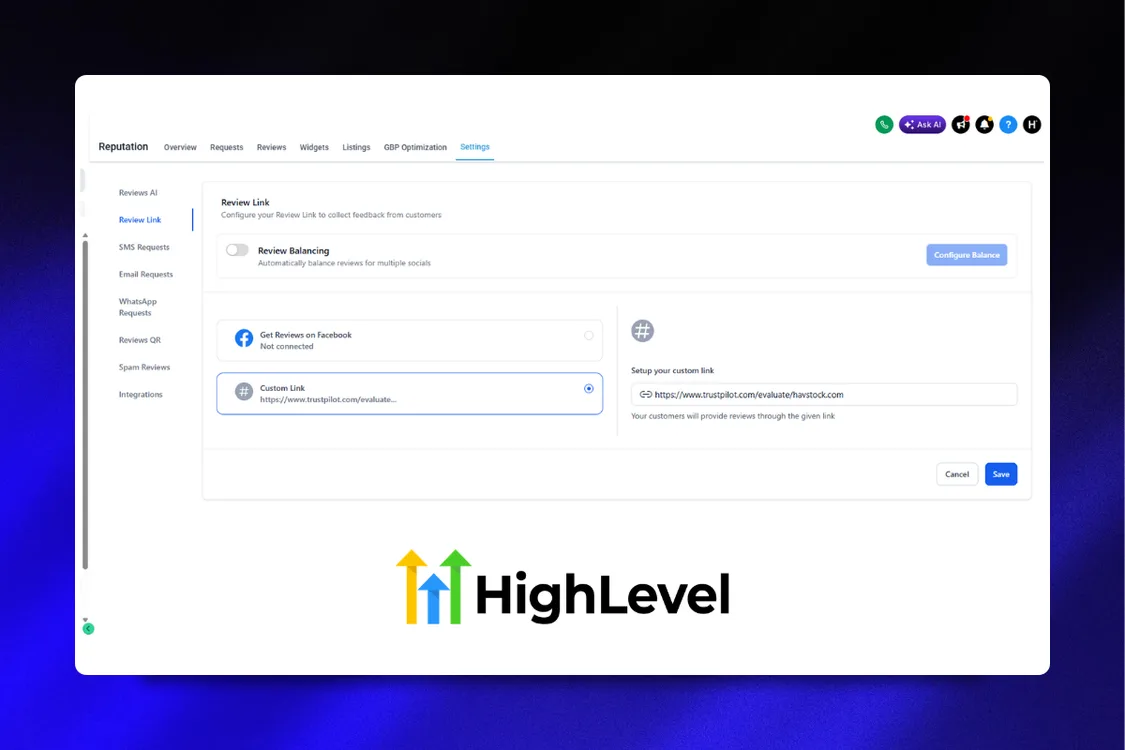
- Custom review links (Trustpilot, Yelp, industry-specific platforms)
Google Business Profile is the priority. If you only connect one platform, make it Google. For coaches and consultants operating online, also consider Trustpilot or your industry-specific directory.
Step 2: Configure Your Review Request Template
GoHighLevel lets you create templates for review request messages sent via email and SMS. Here is what works:
SMS Template (higher response rates):
"Hey [First Name], it was great working with you! Would you mind leaving a quick review about your experience? It takes less than 60 seconds: [Review Link]. Thanks so much!"
Email Template:
Subject: Quick favor, [First Name]?
Body: Keep it short. Thank them for working with you, mention a specific result if possible, include the review link with a clear call to action, and set expectations on time ("takes about 60 seconds").
Keep both templates conversational, not corporate. The message should feel like it came from a person, not a marketing automation. Because technically, it did come from a person. You just automated the timing.
Step 3: Set Up the Review Link
GoHighLevel generates a custom review link that you can include in messages. This link can:
- Direct happy customers to leave a public review on Google or Facebook
- Redirect unhappy customers to a private feedback form instead
This two-step flow is critical. It is called a "review gate" or "sentiment filter," and it protects your public profiles while still capturing honest feedback from dissatisfied clients.
“Never send unhappy clients to a public review page. Capture their feedback privately and fix the problem first.”
Step 4: Create a Reputation Dashboard Widget
Add the reputation widget to your GHL dashboard to monitor incoming reviews at a glance. The widget shows:
- Total reviews across platforms
- Average star rating
- Recent reviews with text
- Review request status (sent, completed, pending)
Check this weekly at minimum. Daily if you are running active review campaigns.
Building the Review Request Workflow
The real power of GHL's reputation management is in the automation. Here is how to build a workflow that requests reviews at the perfect moment.
Trigger: When to Ask
Timing is everything. Ask too early and the client has not experienced results yet. Ask too late and the excitement has faded. The best trigger depends on your business model:
- After a coaching call: Trigger when the call status changes to "completed" in your calendar
- After project delivery: Trigger when a pipeline stage changes to "Delivered" or "Completed"
- After course completion: Trigger when membership completion fires (if using GHL courses)
- After a specific time period: Trigger X days after a purchase or enrollment
For most coaching businesses, the ideal moment is 24-48 hours after a significant milestone. The client has had time to process the value but the experience is still fresh.
Workflow Structure
Here is a complete review request workflow:
- Trigger: Pipeline stage moves to "Completed" (or calendar event completed)
- Wait 24 hours (let the experience settle)
- Send SMS: Review request with direct link
- Wait 2 days
- If/Else: Check if review was submitted
- If yes: Send thank you SMS, tag contact as "Left Review"
- If no: Send follow-up email with review link
- Wait 3 days
- If still no review: Send final gentle reminder via SMS
- Tag contact: "Review Requested" (prevent duplicate requests)
Three touches maximum. After that, move on. Nobody wants to feel hounded for a review.
The Sentiment Filter Step
Before sending the review link, add an intermediate step that asks a simple question:
"How would you rate your experience working with us? Reply with a number 1-5."
Route the response:
- 4-5 stars: Send the public review link (Google, Facebook)
- 1-3 stars: Send a private feedback form and notify your team
This protects your public review profiles while giving unhappy clients a channel to express their concerns. You get actionable feedback, and your public pages stay strong.
“The businesses with the best public review scores are not the ones with zero complaints. They are the ones who catch complaints before they go public.”
Automating Review Responses
Collecting reviews is half the equation. Responding to them is the other half. Google has confirmed that responding to reviews improves local ranking, and it shows potential clients that you are engaged and professional.
Positive Review Responses
Do not overthink this. A genuine thank-you with a personal touch works best:
"Thank you for the kind words, [Name]! It was great working with you on [specific thing]. Excited to see what you build next."
You can create 5-10 response templates and rotate through them. Avoid copy-pasting the exact same response for every review. Google notices, and so do readers.
Negative Review Responses
Negative reviews require a different approach:
- Respond promptly (within 24 hours)
- Acknowledge the concern without getting defensive
- Take it offline: "I would love to discuss this further. Could you email me at [email] so we can make this right?"
- Never argue publicly. You are not trying to win the argument. You are showing future clients how you handle problems.
A well-handled negative review can actually improve trust. People are suspicious of businesses with only 5-star reviews. A few 4-star reviews with thoughtful responses make your profile look authentic.
Setting Up Response Notifications
In GoHighLevel, configure notifications so your team gets alerted when a new review comes in:
- 5-star reviews: Notification to marketing team (share on social, use in testimonials)
- 4-star reviews: Notification to account manager (follow up for specifics)
- 3 stars and below: Urgent notification to business owner (address immediately)
Workflow action: "Send Internal Notification" with if/else conditions based on star rating.
Using Reviews as Marketing Assets
Reviews sitting on Google are good. Reviews embedded across your marketing funnel are better. Here is how to turn collected reviews into conversion tools.
Funnel Testimonial Sections
Pull your best reviews and feature them on your landing pages. A high-converting discovery call funnel page (like the ones you can build with the High Ticket OS) should include:
- 3-5 written testimonials with full names and context
- Star ratings where applicable
- Specific results mentioned ("increased revenue by 40%," "booked 12 new clients")
Place testimonials strategically: one below the hero section, a cluster before the call-to-action, and one in the FAQ area. Surround objections with proof.
Social Media Content
Every 5-star review is a social media post waiting to happen. Create a template:
- Screenshot the review
- Add your brand overlay
- Post with a caption that adds context
- Tag the reviewer if they are comfortable with it
One review per week keeps your social proof visible without being repetitive. Batching this into a monthly content calendar takes 30 minutes.
“Every review is a piece of marketing content you did not have to write.”
Email Signature Social Proof
Add a line to your email signature: "Rated 4.9/5 on Google (87 reviews)" with a link to your profile. Every email you send becomes a subtle trust builder.
Case Study Pipeline
Reviews that mention specific results are case study seeds. When someone writes "I went from 5 clients to 22 in three months," that is your cue to follow up and ask if they would be willing to participate in a detailed case study. Build a workflow that tags reviews mentioning numbers or specific outcomes, and notify your marketing team.
Monitoring Competitor Reviews
GoHighLevel's reputation tools also let you monitor competitors. Set up tracking for:
- Competitors' Google Business Profiles
- Their average ratings and review velocity
- Common complaints in their reviews
Competitor review monitoring gives you two advantages:
- Content ideas: If competitors get complaints about slow response times, write content about your fast turnaround
- Sales ammunition: Know your competitors' weaknesses when prospects compare options
The Numbers That Matter
Track these metrics monthly to measure your reputation management performance:
- Review request sent: How many you are asking
- Review completion rate: Percentage who actually leave a review (aim for 15-25%)
- Average star rating: Overall and per platform
- Review velocity: New reviews per month (consistency matters more than spikes)
- Response rate: Percentage of reviews you respond to (aim for 100%)
- Sentiment distribution: Ratio of 5-star to 4-star to lower
If your completion rate is below 10%, your timing or messaging needs work. If it is above 25%, your system is running well. Focus on maintaining velocity rather than chasing a specific total number.
Advanced: Review-Triggered Referral Requests
Here is a workflow most businesses miss: when someone leaves a 5-star review, they are in peak satisfaction mode. That is the ideal moment to ask for a referral.
Build a workflow:
- Trigger: Contact tagged "Left Review" AND review rating is 5 stars
- Wait 1 day
- Send SMS: "Thanks again for the amazing review, [Name]! Quick question: do you know anyone else who could benefit from [your service]? I would love to help them too."
- If they respond with a name: Create a new contact, tag as "Referral from [Original Client]," add to referral pipeline
This turns your happiest clients into active promoters. The review is the trigger because it captures them at their most enthusiastic. One 5-star reviewer can bring in two or three referrals if you ask at the right moment.
“Your best marketing channel is not ads. It is a happy client who just told the internet how good you are.”
Common Mistakes to Avoid
Asking Everyone at the Same Time
If you send review requests to your entire client list in one batch, you will get a spike of reviews followed by months of nothing. Google prefers consistent review velocity. Space your requests out and build them into your delivery workflow so they happen naturally and continuously.
Incentivizing Reviews
Offering discounts or gifts in exchange for reviews violates Google's policies and can get your reviews flagged or your profile penalized. Never incentivize. The request itself, timed correctly and worded personally, is enough.
Ignoring Negative Reviews
Pretending a negative review does not exist is worse than the review itself. Unanswered negative reviews tell future clients you do not care about feedback. Respond to every single one, even if it is uncomfortable.
Only Focusing on Google
Google is the priority, but do not ignore other platforms. Diversify where your reviews live. Facebook, Trustpilot, and industry directories all contribute to your overall online presence and provide more places for potential clients to find social proof.
Not Using Reviews in Sales Conversations
When a prospect hesitates on a discovery call, pointing them to your Google reviews or sharing a specific testimonial can be the nudge that closes the deal. Train yourself (or your sales team) to reference reviews naturally during conversations.
FAQ
How often should I send review requests?
Build review requests into your delivery workflow so they go out automatically after every client engagement. Do not batch them. Consistent, steady review collection is better for your Google ranking and looks more authentic than 20 reviews in one week.
What is a good response rate for review requests?
A 15-25% completion rate is solid. If you are below 10%, adjust your timing (are you asking too early or too late?) and your messaging (is it too formal?). SMS requests consistently outperform email for review collection.
Can I remove a negative review from Google?
You cannot remove legitimate negative reviews. You can flag reviews that violate Google's policies (spam, fake reviews, irrelevant content), but genuine negative feedback will stay. Your best strategy is to respond professionally and bury it with a steady flow of positive reviews.
Should I use a review gate / sentiment filter?
Yes, but carefully. Google's guidelines discourage selectively soliciting only positive reviews. The approach we recommend asks everyone for feedback first, then routes happy clients to the public review page and unhappy clients to a private form. This gives everyone a voice while protecting your public profiles.
How many reviews do I need to rank well on Google?
There is no magic number, but businesses with 40+ reviews typically see significant local SEO benefits. More important than the total count is consistency. Aim for 4-8 new reviews per month rather than a one-time push to hit a number.
Can GoHighLevel monitor reviews across multiple platforms?
Yes. GoHighLevel's reputation management connects to Google, Facebook, and other platforms. You can view all reviews in one dashboard without logging into each platform separately.
What is the best channel for sending review requests, email or SMS?
SMS wins for review requests. Open rates for text messages hover around 98% compared to 20-25% for email. Keep the SMS short, personal, and include a direct link. Use email as a follow-up for those who do not respond to SMS.
How do I handle a client who threatens a bad review?
Stay calm and professional. Reach out directly to understand their concerns and try to resolve the issue before it becomes a public review. Document the interaction. If a review is posted that contains false information or violates platform policies, you can flag it for removal.
Ready to put your reputation on autopilot and turn happy clients into your best marketing channel? Grab the High Ticket OS and build a system where reviews, funnels, and follow-up all work together inside GoHighLevel.